EntOS Voice · Platform assistant design
From commands to an assistant across brands and devices
The voice experience we were evolving was built around commands: search, play, open. Expanding it into an assistant raised a larger design question: how should it help people understand what was happening, discover what they could do, and take a useful next step?
We were designing for EntOS, a shared entertainment platform serving experiences across Xfinity, Xumo, XClass, Sky TV, and future partners. The assistant needed behavior and capabilities that could work across different brands and interfaces.
The work began on TV, with a broader ambition to support other devices and situations where a TV and phone could work together. That made reuse a core requirement from the beginning.
My contribution
I defined the assistant’s states and communication requirements, originated and advocated for smart suggestions, directed motion design, and shaped decisions about speech feedback, responses, and errors. I also guided the application of the shared behavior and suggestions capability in a mobile prototype.
Project outcome
Delivered production specifications and design assets for v1 of the EntOS assistant interface to the production development team. Functioning TV and mobile prototypes supported feature development and testing of shared capabilities across interfaces.
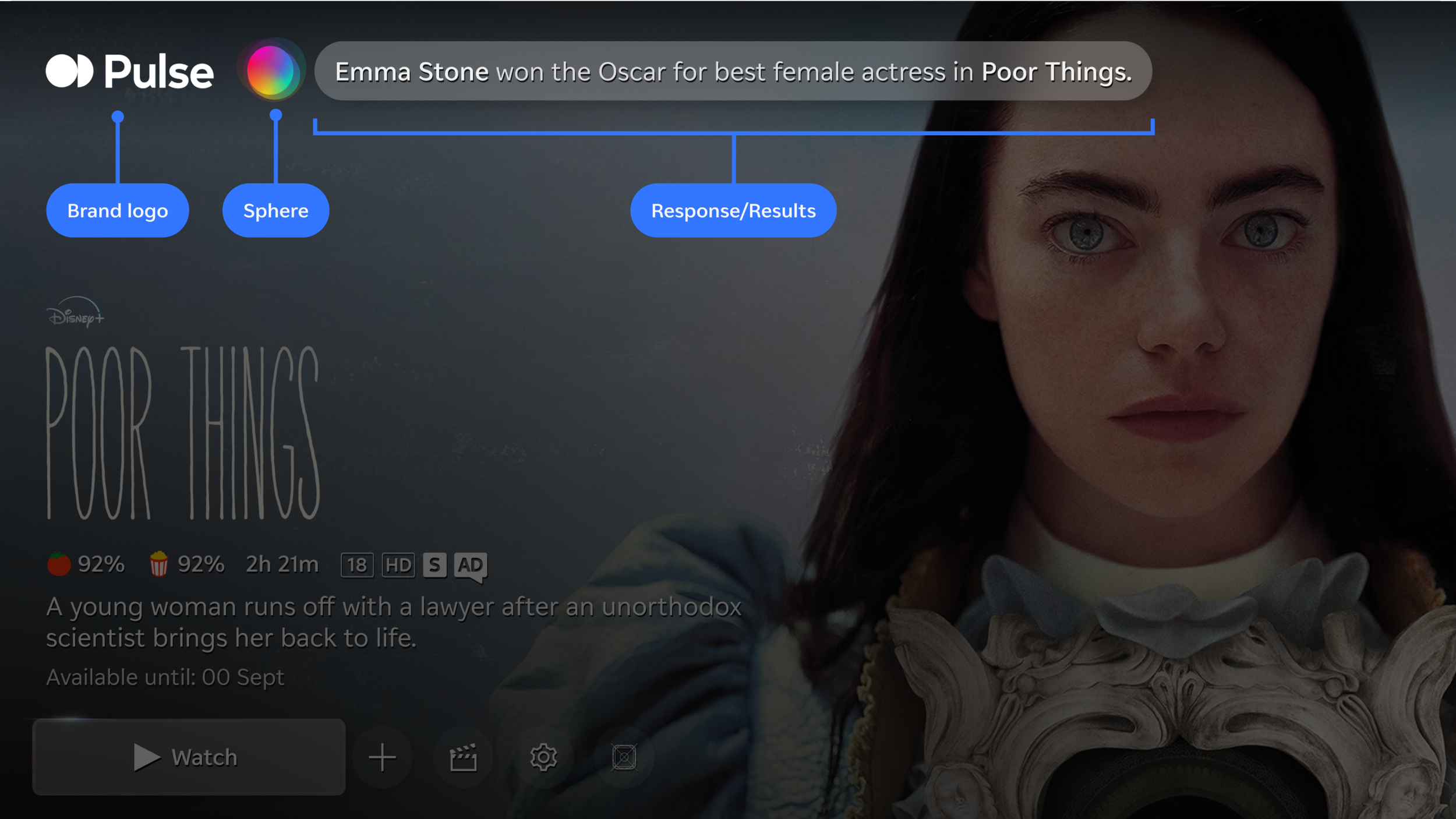
TV assistant overlay exploration, showing the relationship between brand identity, assistant presence, and response content.
Define how the assistant communicates
A conversational assistant needs to communicate throughout an interaction: when it is ready, when it is listening, when it is processing a request, and what happens when it responds or encounters a problem.
I defined the purpose of those states and what each needed to communicate to users. This gave the team a shared foundation for developing motion, text, sound, and recovery behavior.
Designers then developed that direction into detailed specifications covering triggers, transitions, timing, and visible feedback.
Defining voice behavior across states

Mapping the interaction across voice, brief sound cues, and visual feedback. ASR refers to automatic speech recognition, which converts speech into text.
From intent to detailed behavior
The specifications connected each state to the conditions that triggered it, what the system would do, and what users would see. They also addressed timing, speech transcription, and transitions into the next state.
This translated the interaction model into behavior the team could build.
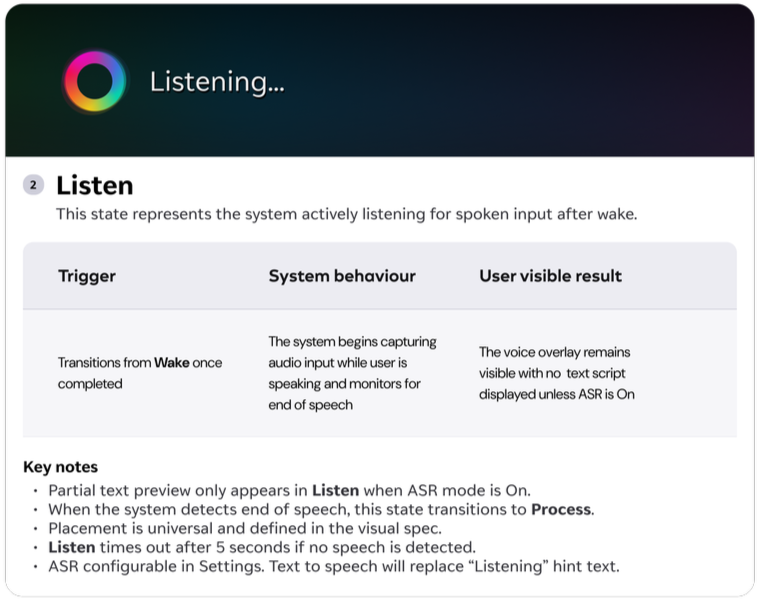
Listening-state documentation developed by the team from the shared model and communication requirements.
Make listening unmistakable
Our early explorations relied on an animated sphere or halo to signal assistant activity. I did not believe that its appearance and animation made the beginning of listening obvious enough.
The user needed a clear signal that the system had begun capturing their voice.
I made that a requirement for the motion exploration and directed Jonathan Alsop to develop ways to reinforce listening beyond the icon. The resulting TV direction added a full-width animation at the top of the screen, using branded colors and gradients.
The Everything App prototype adapted that treatment to the assistant input area at the bottom of the mobile screen. The placement changed to suit the interface, while the communication requirement carried across.
Give people a useful next step
I wanted the assistant to offer richer responses with imagery, content details, and relevant actions. Those responses were outside the scope of early phases.
I proposed using the existing assistant area to surface initial suggestions and follow-up actions. This could introduce capabilities, inspire voice commands, and help people discover what to do next within the interface we could build.
The idea drew on a more limited suggestion pattern in X1, Xfinity’s earlier TV interface, which I had also helped shape. I advocated for a new implementation with updated presentation and AI to help determine which suggestions would be useful.
Make suggestions relevant and actionable
With my designers, conversational AI designer Jenny Mero, and Experience Design Engineering, the team building functioning prototypes, we worked through ways to identify likely next steps.
That included developing instructions for the AI and labeling content with descriptive information it could use. We also considered what users could actually access through their subscriptions.
A suggestion needed to account for both the user’s request and the actions available to them.
Design within the interface constraints
The direction included using AI to generate interface content and copy that fit the containers and character limits we had defined.
Those constraints needed to inform what the system produced from the start. Working through these solutions with the design and engineering teams brought smart suggestions into a functioning TV assistant prototype.
Build the capability for more than one interface
EntOS served multiple brands and devices. The intelligence and content data behind suggestions needed to be available as a shared service that other experiences could use.
Throughout development, I repeatedly checked that we were building toward that requirement. I then ensured that the Everything App engineers implemented the capability in their mobile build to test reuse beyond TV.
Carry the capability across
The mobile implementation tested whether the underlying suggestions capability could be used in another experience.
This made reuse part of the working prototype effort, with engineers applying the capability beyond its original TV interface.
Adapt the interaction to the device
I also guided the app’s use of our patterns for timing, animation, response wording, and errors.
The interface could adapt to the phone while retaining the communication requirements we had established. The listening treatment was one visible example of that translation.
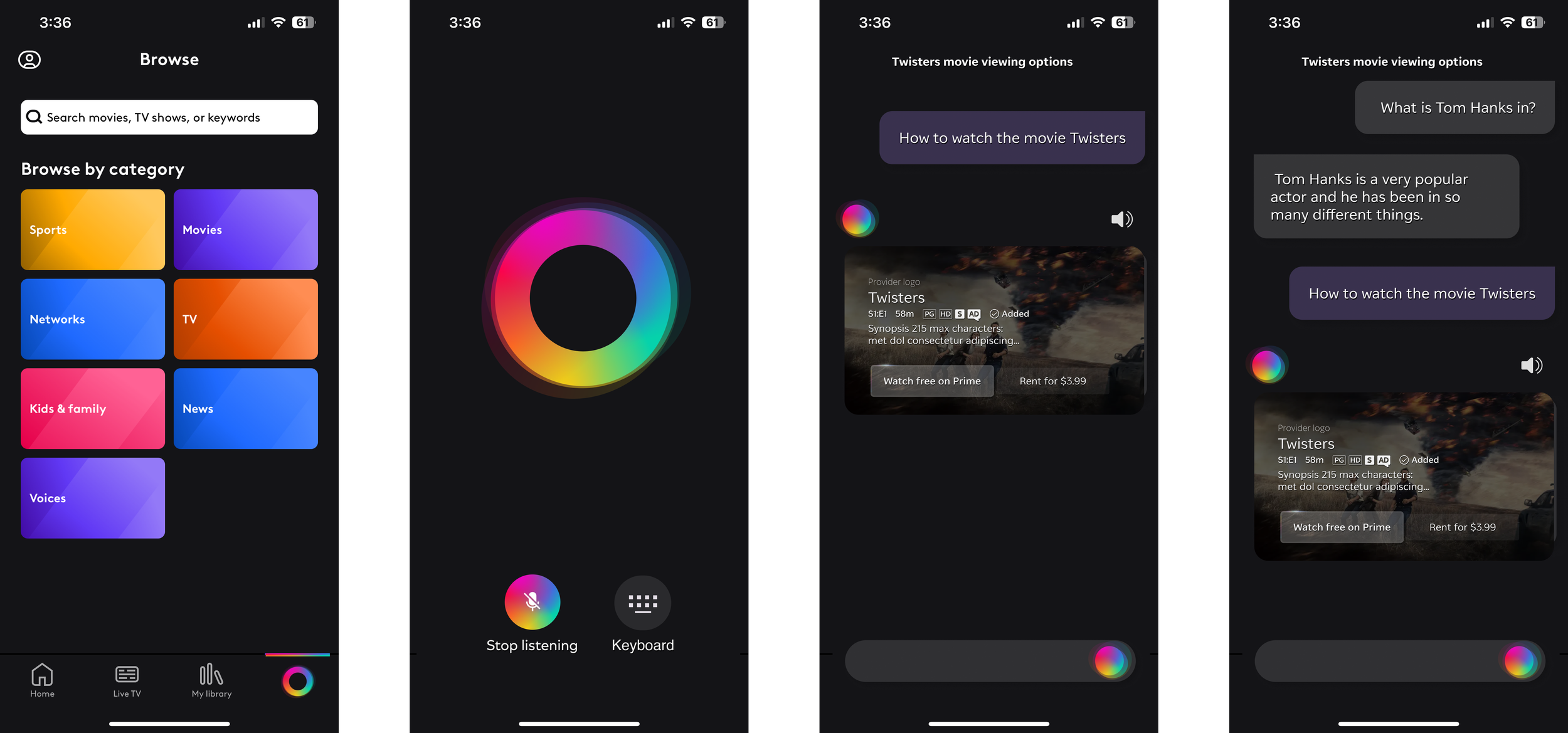
Mobile concept explorations showing voice input, text, and richer responses. These illustrate the broader design direction; the reuse implementation described here took place in the Everything App build.
What became real
fpo
fpo
My approach to AI interaction
I focus on the decisions that make an assistant useful and understandable: what people need to know, which actions they can take, and how the interface helps them move forward.
In this work, that meant making listening perceptible, developing suggestions within delivery constraints, considering subscription access, and treating interface limits as requirements for generated content. It also meant testing reuse in another experience so the platform ambition had a practical implementation behind it.
Collaboration
My designers developed flows and detailed specifications. Jonathan Alsop developed motion under my direction. Jenny Mero and Experience Design Engineering worked with us on conversational behavior and functioning prototypes. The Everything App designers and engineers developed the mobile interface and implementation.